
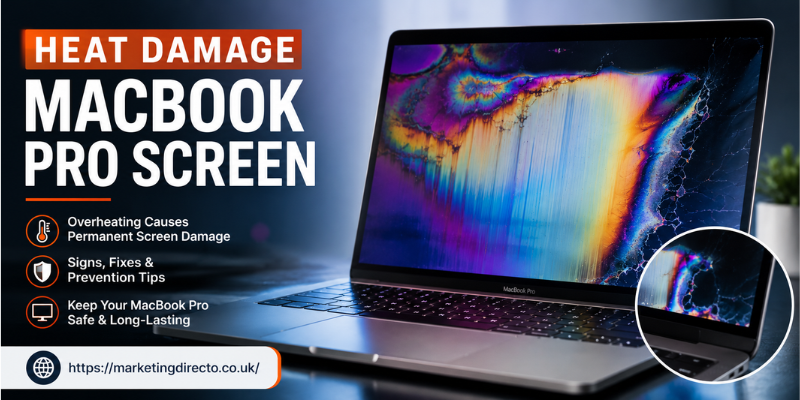

Heat damage MacBook Pro screen problems are more common than many users realize, especially when laptops are exposed to high temperatures or poor ventilation for extended periods. Excessive heat can affect display quality, reduce screen lifespan, and even damage internal components connected to the display assembly. If you’ve noticed discoloration, flickering, or unusual screen behavior, heat could be the underlying cause. This guide explains everything you need to know about identifying, preventing, and fixing heat-related screen issues on a MacBook Pro.
Heat Damage MacBook Pro Screen: Common Causes of Overheating
MacBook Pro displays are engineered to withstand normal operating temperatures, but prolonged exposure to excessive heat can still cause damage.
Common causes include:
- Blocking the laptop’s cooling vents
- Using the MacBook on soft surfaces like beds or couches
- Direct sunlight for long periods
- Running demanding software for hours
- Dust buildup inside the cooling system
- Faulty cooling fans or thermal sensors
Over time, these conditions can increase internal temperatures and negatively affect the display.
Warning Signs of Heat Damage on a MacBook Pro Display
Recognizing early symptoms can help prevent more expensive repairs.
Screen Discoloration and Bright Spots
Heat may cause yellowish patches, uneven brightness, or permanent discoloration on the LCD or mini-LED display.
Display Flickering and Random Lines
Overheating can affect display cables or internal display components, leading to flickering, horizontal lines, or intermittent image problems.
Screen Ghosting and Image Retention
Some users may notice faint images remaining visible after changing screens. Although temporary image retention isn’t always caused by heat, prolonged overheating can contribute to display degradation.
Unexpected Display Shutdowns
If your MacBook becomes extremely hot, it may automatically reduce performance or temporarily disable the display to protect internal components.
How Excessive Heat Affects MacBook Pro Screen Performance
Heat doesn’t only impact the display panel itself. It can also affect several nearby components.
Possible effects include:
- Reduced display brightness
- Shortened screen lifespan
- Damage to display connectors
- Weakened adhesive around the screen assembly
- Increased risk of hardware failure
Modern MacBook Pro models include thermal management systems, but persistent overheating can still lead to long-term issues.
Preventing Heat Damage to Your MacBook Pro Screen
Improve Airflow Around Your Laptop
Always place your MacBook Pro on a hard, flat surface where air can circulate freely.
Avoid:
- Blankets
- Cushions
- Pillows
- Thick carpets
These materials block ventilation and trap heat.
Keep Cooling Vents Clean
Dust buildup reduces cooling efficiency.
Cleaning the air vents periodically helps maintain proper airflow and lowers operating temperatures.
Avoid Direct Sunlight
Leaving your MacBook Pro inside a hot vehicle or under direct sunlight can expose the display to temperatures beyond Apple’s recommended operating range.
Whenever possible, use the laptop in a cool environment.
Monitor System Temperature
Monitoring software can help users identify unusually high operating temperatures before they become serious hardware problems.
If your MacBook frequently overheats during light tasks, professional inspection may be necessary.
Can Heat Damage a MacBook Pro Screen Permanently?
Yes, severe overheating can permanently damage display components.
Permanent damage may include:
- Dead pixels
- Permanent discoloration
- Display panel failure
- Internal cable damage
- Screen brightness issues
However, many temporary display problems disappear once the device cools down. Persistent symptoms should be evaluated by a qualified repair technician.
Repair Options for Heat-Damaged MacBook Pro Screens
Repair costs depend on the severity of the damage.
Possible solutions include:
- Display diagnostics
- Internal cleaning
- Cooling fan replacement
- Display cable repair
- Complete screen replacement
If your MacBook is still under warranty or covered by AppleCare+, check whether repair services are available before paying for replacement parts.
Tips to Extend Your MacBook Pro Display Life
Following a few simple habits can significantly reduce the risk of overheating.
Best practices include:
- Keep software updated
- Close unnecessary background applications
- Avoid extreme temperatures
- Use certified chargers
- Clean cooling vents regularly
- Restart your Mac periodically
- Store the laptop in a cool, dry place
These habits help maintain both display performance and overall system health.
Frequently Asked Questions
Can heat permanently damage a MacBook Pro screen?
Yes. Excessive heat over long periods can permanently damage display components, causing discoloration, flickering, or complete screen failure.
How do I know if my MacBook Pro screen has heat damage?
Common symptoms include bright spots, yellow patches, flickering, image retention, reduced brightness, and unexpected display issues during high temperatures.
Can a cooling pad prevent MacBook Pro overheating?
A cooling pad may improve airflow in certain situations, although keeping vents unobstructed and using the laptop on a hard surface remains the most effective solution.
Will a heat-damaged MacBook Pro screen repair itself?
Temporary display issues caused by overheating may disappear after cooling down, but permanent heat damage usually requires professional repair.
How can I prevent heat damage to my MacBook Pro screen?
Maintain good airflow, avoid direct sunlight, clean cooling vents regularly, update macOS, and avoid blocking ventilation while using the laptop.
Conclusion
Heat damage MacBook Pro screen problems can range from temporary display glitches to permanent hardware failure if overheating continues unchecked. Understanding the warning signs, improving ventilation, and following proper maintenance habits can significantly reduce the risk of costly repairs. By keeping your MacBook Pro cool and well-maintained, you can protect its display and extend its overall lifespan for years to come.
Stay in touch to get more updates & alerts on marketingdirecto.co.uk! Thank you